Rebuilding a media simulator that planners kept leaving for spreadsheets
A global CPG company had a media simulator that told planners where to put their money. But it planned one cell at a time (market × brand × region × sub-brand), only from a budget, and everything sat on one page. Planners don’t plan one cell, though. They plan a whole portfolio. So a planner covering four brands ran four scenarios, stitched them together in Excel before anything could go to their leadership, and dropped off. The new simulator asks what you’re trying to do first, and plans the whole portfolio in one run.
- Client
- A global CPG company
- Role
- Sole designer
- Process
- User interviews, three approaches, OOUX, flows, edge states
- Timeline
- 3 months
At a glance
What moved
- Per portfolio plan, down from four scenarios and an Excel file
1 run
Per portfolio plan, down from four scenarios and an Excel file
- Ways to plan: from a budget or from a target
2
Ways to plan: from a budget or from a target
- Stages, the same for every approach
5
Stages, the same for every approach
- New objects: combination, portfolio, constraint
3
New objects: combination, portfolio, constraint
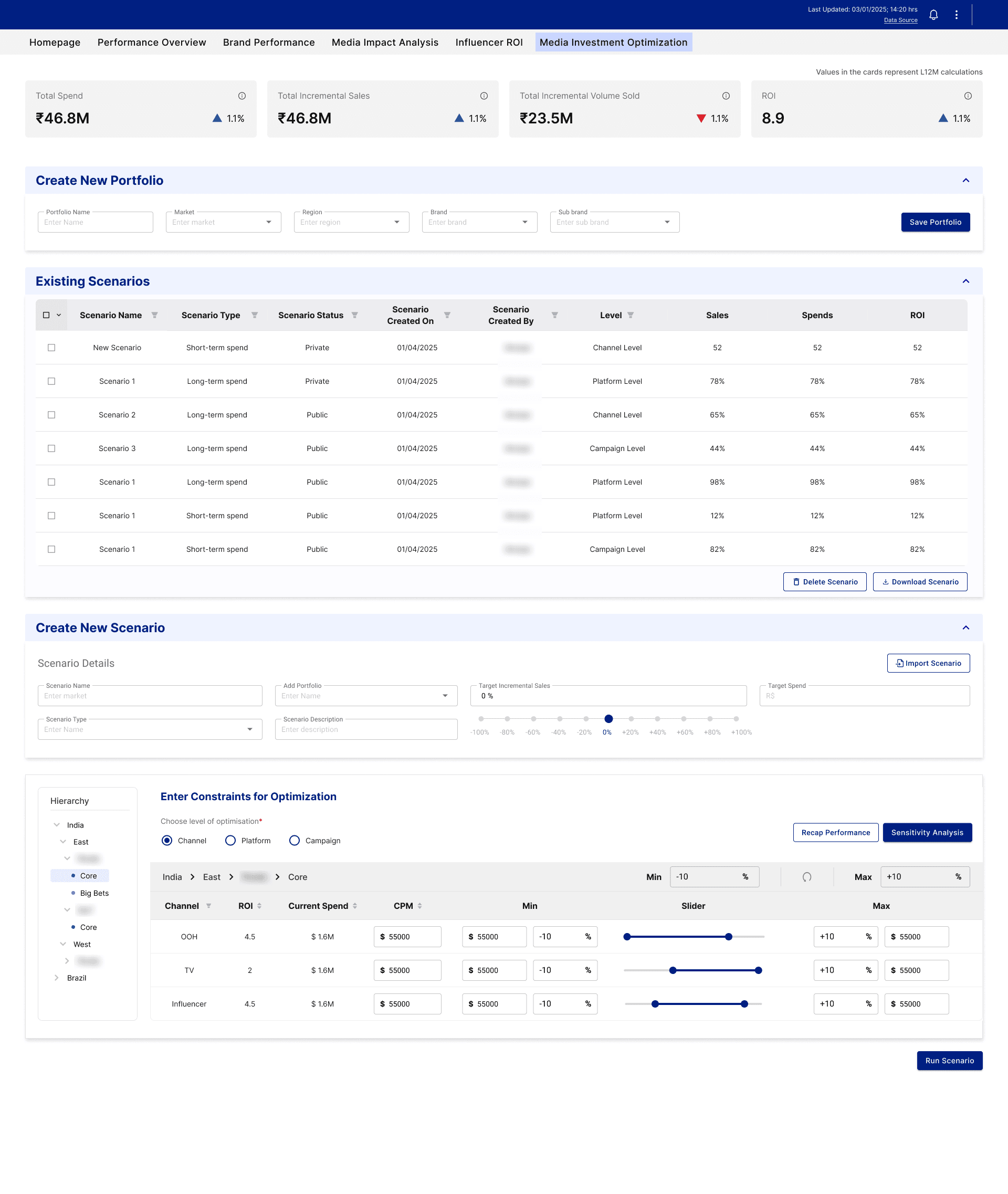
What was wrong with the old simulator
The model was fine, right? It did single-cell planning well. It just didn’t scale to how planners actually work.
- One combination per run. Each run covered one cell. A portfolio plan meant several runs, and the planner had to reconcile the outputs by hand.
- Only one way to plan. You could only go forwards from a budget. You couldn’t start from a business target and let the tool work back to the spend. And that’s the most common question planners get asked.
- Everything on one page. Scope, constraints and setup, all together on one screen. Fine for one cell. Really heavy once a plan covered many.
- Nothing got saved. Market, brand, region, sub-brand were just filters. The screen read them, and then they were gone. So you set up the same thing every single time.
- Problems showed up after the run. You’d only find out something was off once the run had already gone out and come back.
The bigger the plan, the more the work multiplied. The tool didn’t take on any of that scale. The planner did.
The jobs
These came out of the user interviews and all the feedback on the old flow. They’re what planners were actually hiring the simulator to do.
- 01
“Let me plan my whole portfolio in one go.”
When I plan across several brands and markets, I want to plan them together, so I don’t run four scenarios and stitch them in Excel.
- 02
“Let me start from my target.”
When I’ve got a business target, I want the tool to work back to the spend that gets me there, so I can answer the question I actually get asked.
- 03
“Ask me what I’m trying to do first.”
When I start a plan, I want to pick my approach first, so I only see what matters for it.
- 04
“Let me reuse my setup.”
When I’ve built my scope once, I want to save it and plan with it again, so I’m not re-entering the same thing every cycle.
- 05
“Tell me what won’t work before I run it.”
When a combination isn’t available or data is missing, I want to know at setup, so I’m not waiting on a run that fails.
- 06
“Let me compare my options.”
When I’ve got two plans, I want to see them side by side against last year’s numbers, so I can pick the one I’ll present.
What was delivered
So the simulator got rebuilt around intent. You say what kind of planning you’re doing, and everything after that adapts to it.
| In the old simulator | In the new simulator |
|---|---|
| One cell per run | A portfolio: many brand-market combinations, planned together in one run |
| Only forwards from a budget | Pick your approach: Spend based, Goal based, or In flight |
| Everything on one page | One journey in five stages: Approach → Scope → Plan → Run → Compare |
| Scope was a filter that disappeared | Scope is something you build, name, save and reuse |
| Errors after the run | Problems caught at setup, before anything runs |
| Comparing only the same type | Compare across approaches, against the MAT baseline |
Role: Sole designer. Discovery, user interviews, the three approaches, OOUX, flows and all the screens.
Three approaches
So after discovery and the interviews, it came down to one question: what does a planner want to know when they open this tool?
There were three good answers to that. Each one got mapped as a full journey, from landing to results, with what it’s good at and what it costs. Then all three went to the client, with the pros and cons laid out side by side.
- Option 1
Inline
They know nothing new. Same entry, same screens as today.
- Existing scenarios
- New scenario
- Inline filters
- Save as portfolio?
- Set constraints
- Run
- Results + compare
- Optimises for
- Adoption. It mirrors the current flow exactly, so nobody has to relearn anything.
- Trades away
- Portfolio clarity. Planners don’t see a portfolio until they’ve already done the work, so multi-brand planning stays hidden.
- When it wins
- The portfolio only shows up when it actually adds value, not as a forced step.
- Risks
- The “Save as portfolio?” prompt becomes one more dialog people close without reading.
- Option 2
Portfolio first
They know their portfolio. The portfolio is the first thing they see.
- Portfolio shelf
- Pick or create a portfolio
- New scenario (scoped)
- Set constraints
- Run
- Results + compare
- Optimises for
- Clarity. The portfolio is the first thing on screen, so the idea sinks in before anything else.
- Trades away
- Ease for people coming from the old tool. They have to make or pick a portfolio before they can do anything, and that’s a new step.
- When it wins
- Multi-brand category leads, and second-time users who’ve already built up a few portfolios.
- Risks
- An empty screen on day one, and “why do I have to make a portfolio first?” in every demo. Single-scenario users get an extra click.
- Option 3Recommended
Intent first
They know their goal. What they’re trying to do is the first thing they pick.
- Pick your intent
- Scope (portfolio or filters)
- Set up for that intent
- Constraints (or skip)
- Run
- Results for that question
- Optimises for
- Decision speed, for planners who already know what they want.
- Trades away
- Exploring. Once you pick an intent, the screens commit to it, so someone who doesn’t know yet gets stopped at the door.
- When it wins
- Repeat work, like running the same kind of plan every week. And In flight becomes a real choice, not something buried in a dropdown.
- Risks
- It’s a new pattern, so it needs some learning. And someone asking “what can I do here?” has no neutral way in.
Why intent first
We recommended intent first, and the client went with it. Three reasons:
Planners come in with a question. So the first screen asks it back.
It starts with their question
The portfolio doesn’t go away. It just happens while you scope.
The portfolio stays
Each screen only shows what that intent needs.
Less on every screen
And the risks are covered: recent optimisations give a way in without picking anything, and one journey means the new pattern is learned once.
One journey for every approach
So now, you pick your approach first. But it’s not a different flow for each one. The same five stages carry every approach, and only the Plan stage changes.
Spend based
I have a budget
- Approach
- Scope
- Set budget & rules
- Run
- Compare
Goal based
I have a target
- Approach
- Scope
- Set target & rules
- Run
- Compare
In flight
Coming next
- Approach
- Scope
- Plan adapts
- Run
- Compare
Scope, Run and Compare stay exactly where they were. So a planner learns one journey, and a new approach doesn’t reset that.
A day in the life, before and after
Let’s say you’re a planner, and you’ve got four brands across a couple of markets this quarter.
Before
- 1
Open the simulator
One page. Set the filters for brand one.
- 2
Fill in everything
Scope, constraints, budget, all on one screen.
- 3
Do it again
Same setup for brands two, three and four.
- 4
Guess a budget
Your boss wants a target hit. The tool can’t start from one.
- 5
A run fails
Something wasn’t available. You find out now.
- 6
Stitch it in Excel
Four outputs, by hand.
4 runs + an Excel file
After
- 1
Pick Goal based
You’ve got a target, so you start there.
- 2
Build your scope
All four brands, in one place.
- 3
Save it as a portfolio
Next cycle, it’s already there.
- 4
Set target and rules
Apply a rule to many rows at once.
- 5
See the flag at setup
One combination isn’t available. Fixed before you run.
- 6
Run once, then compare
Side by side with a Spend based version.
1 run
The decisions that shaped it
Picking intent first was the big one. These are the calls that came after it.
- 01
One journey, not one flow per approach.
Every approach runs Approach → Scope → Plan → Run → Compare. Only the Plan stage changes. So planners learn it once, and goal based went in without a new flow.
- 02
Scope became something you can save.
It used to be a filter the screen read and threw away. Now it’s combinations you build, name as a portfolio, and plan with again next cycle.
- 03
Rules live on their own.
A constraint is a spend rule for a scope × channel, kept separate from the screens. So new kinds of rules extend it, instead of changing how planning works.
- 04
Catch problems at setup, not after the run.
Combinations that aren’t available in a market, missing data and locked rows show up while you’re setting up. Nobody waits on a run that comes back failed.
- 05
Compare across approaches.
A spend based plan and a goal based plan sit side by side, against the MAT baseline, so the planner picks the one they’ll present.
- 06
Show In flight before it’s live.
It sits on the landing as inactive, so planners know it’s coming, and the structure it needs is already there.
The process
- Discovery and user feedback. Went through everything users had said about the old flow, and where it was breaking.
- User interviews. Talked to planners about how they actually plan across a portfolio, and where the time really goes.
- Three approaches. Inline, portfolio first and intent first, each mapped as a full journey with its trade-offs. All three went to the client, and we recommended intent first.
- OOUX. Mapped the old tool as objects. That’s where the real problem showed up: scope was never an object. It was just a filter the screen read and then threw away. So any request to work across more than one cell had nothing to attach to.
- One journey. Five stages for every approach, with only the Plan stage changing.
- The states nobody sees. Five screens, and a lot of their states are about failures, limits and missing data. The old tool showed problems after a run had already gone out. These get caught at setup.
Three objects hold it together
The OOUX map of the old tool showed the real problem: scope was never an object. So three had to exist before any of this could work. The planning hierarchy and the media hierarchy never touch directly. They only meet through a junction object, and that object holds the relationship.
A new kind of rule
Constraint
Rules are their own object, so a new one extends it. Already proven: today’s channel spend rules run on it.
A new approach, like In flight
Scenario · Plan stage
Approach, Scope, Run and Compare don’t care which type made them. Already proven: goal based went in this way.
One cell or a whole portfolio
Combination
A portfolio is just a set of combinations, so there are no special cases. Already proven: portfolio planning runs on it today.
So every time a new request comes in, it plugs into one of these objects. The work goes into the new feature, not into rebuilding what’s underneath.
Final design
- 01
Pick your approach
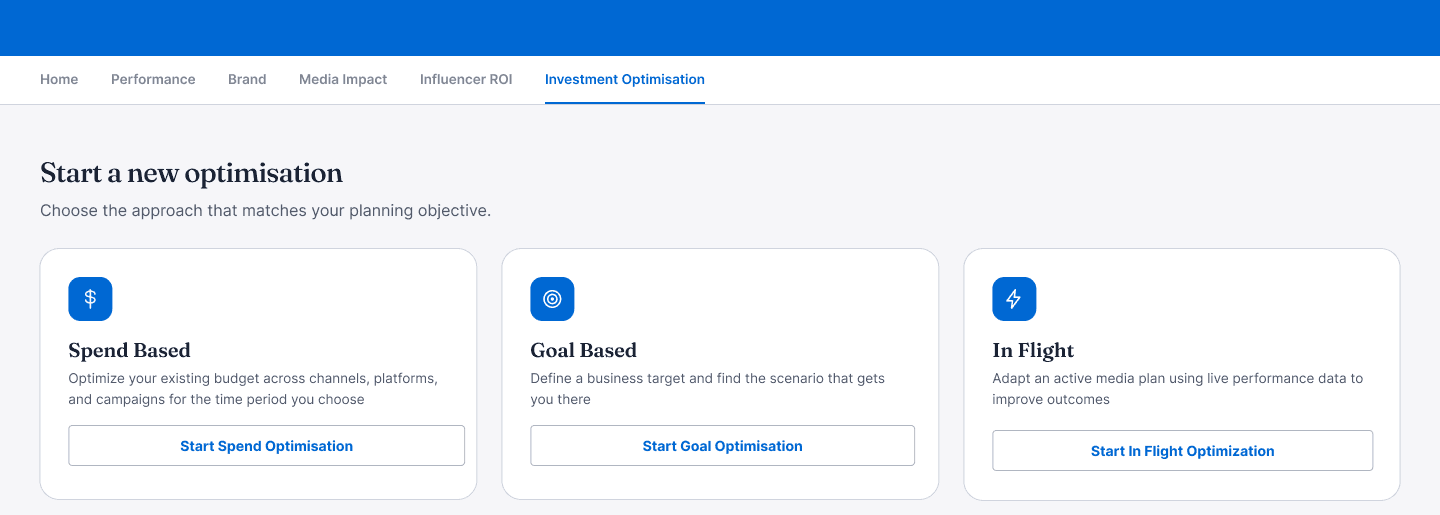
Start a new optimisation: Spend based, Goal based and In flight. This wasn’t there before. You say what kind of planning you’re doing first, and the rest of the flow follows from that.
- 02
Pick up where you left off
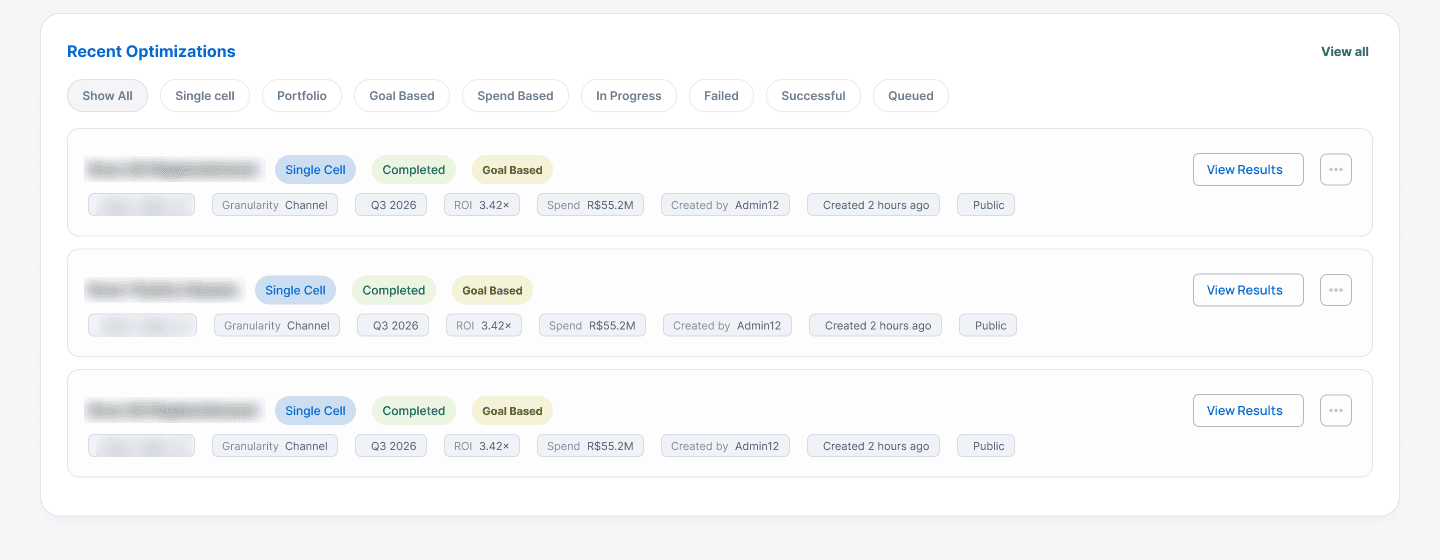
Recent optimisations, filtered by type or status. Brand names blurred. Every run is listed with its scope, quarter, ROI and spend. Filter by type or status, and open the results straight from here.
- 03
Build your scope
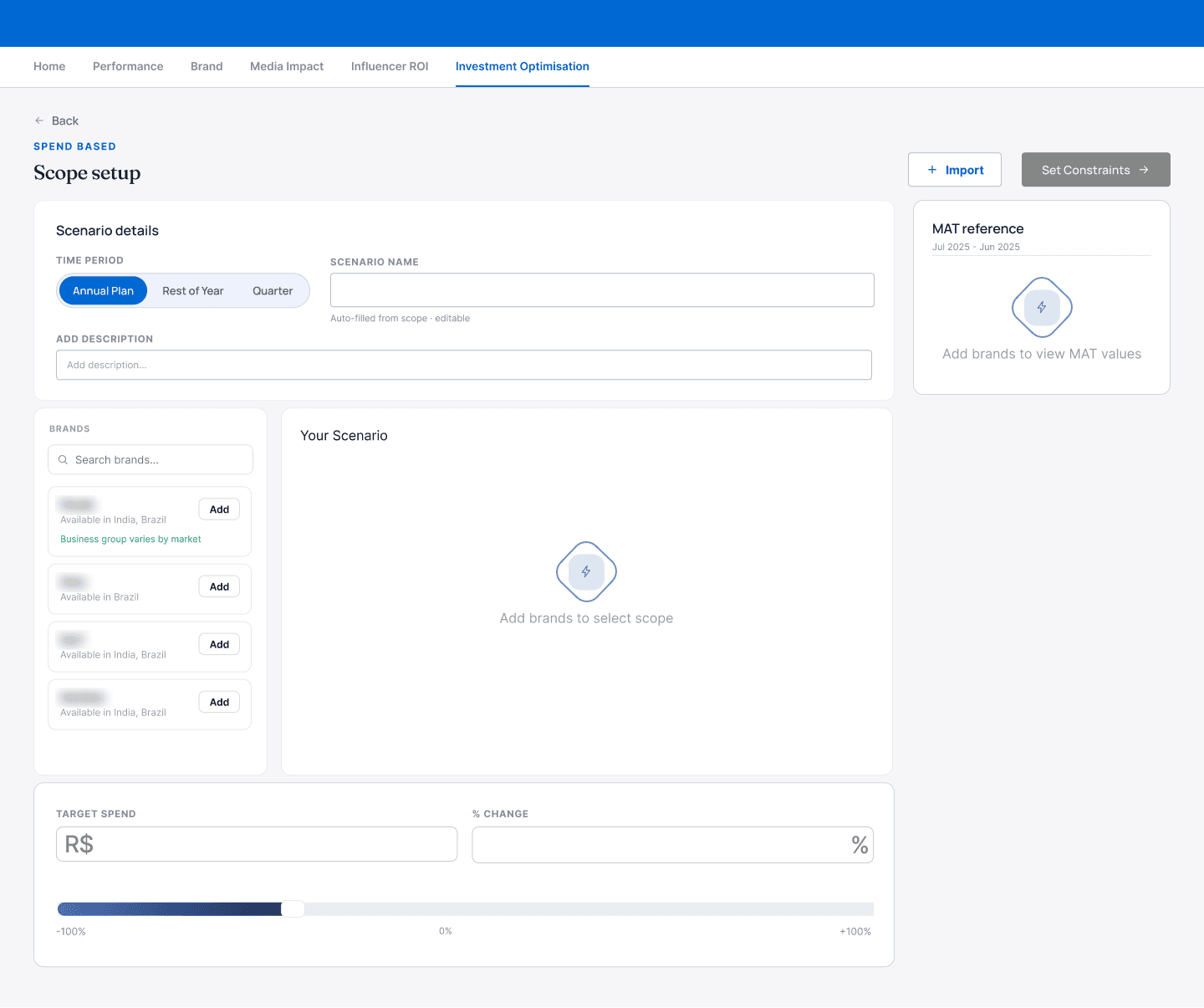
Scope setup, before any brands are added. Brands on the left, your scenario on the right, MAT reference alongside. Add brands, build the combinations you want to plan together, and save them as a portfolio. Last year’s numbers sit right next to it, so you always know your starting point.
- 04
Set your rules once
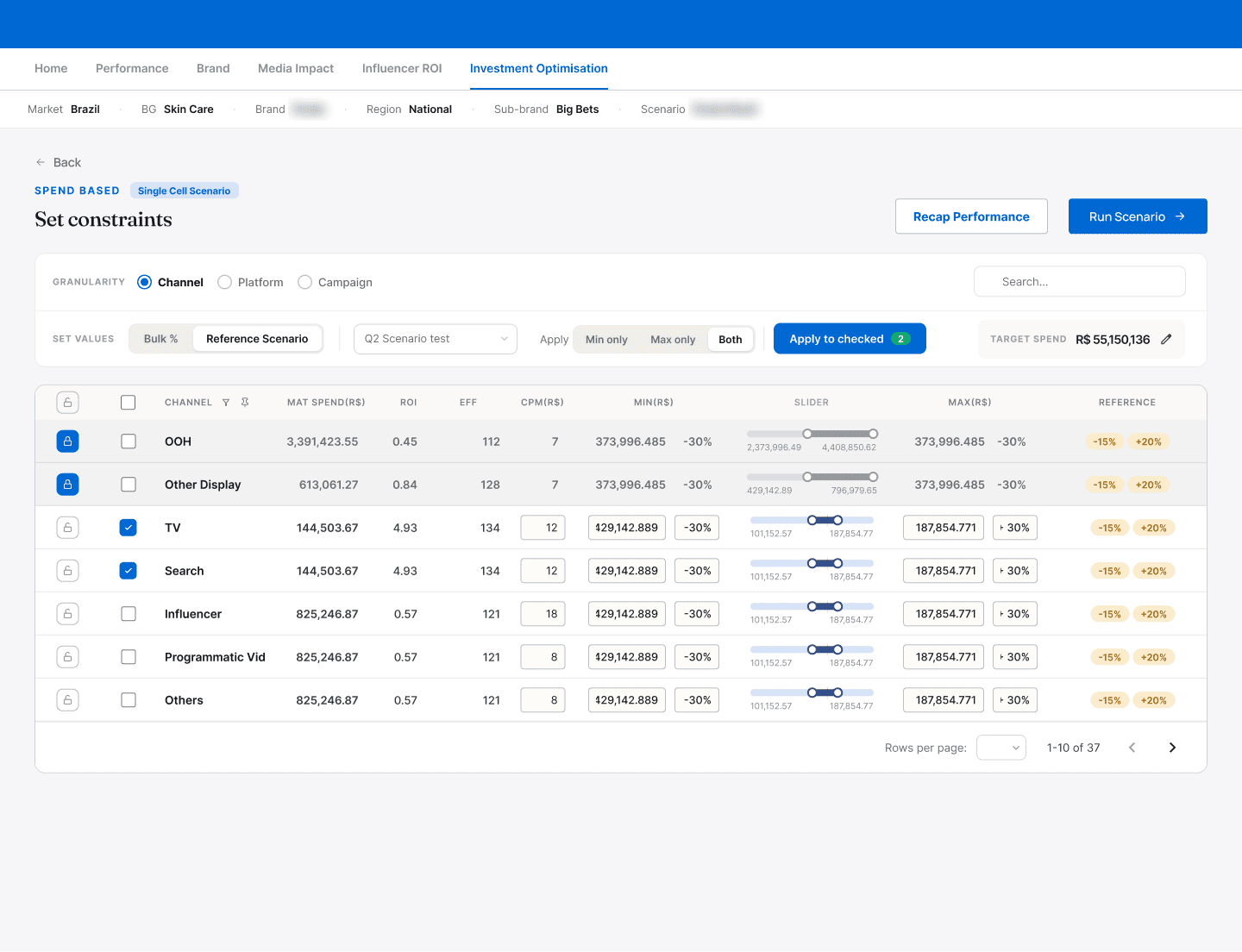
Set constraints: two rows checked, rules taken from a reference scenario, two rows locked. Check the rows, apply a rule to all of them at once, or start from a past scenario. Even at 37 rows, it stays manageable.
- 05
Read the result
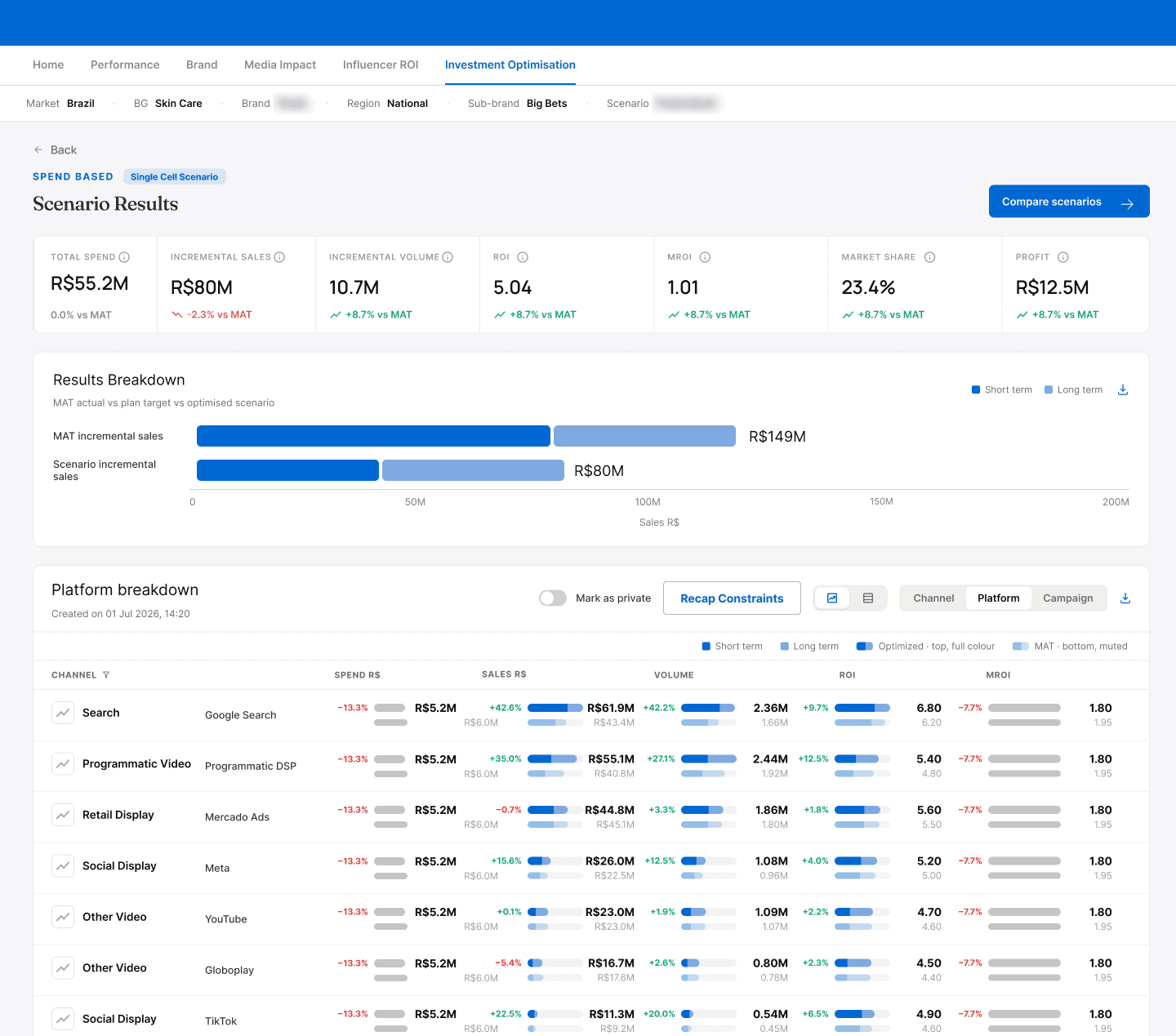
Scenario results against the MAT baseline, broken down by platform. The result sits against last year’s numbers. If the target isn’t met, you see the shortfall, not just a “no”.
- 06
Compare and decide
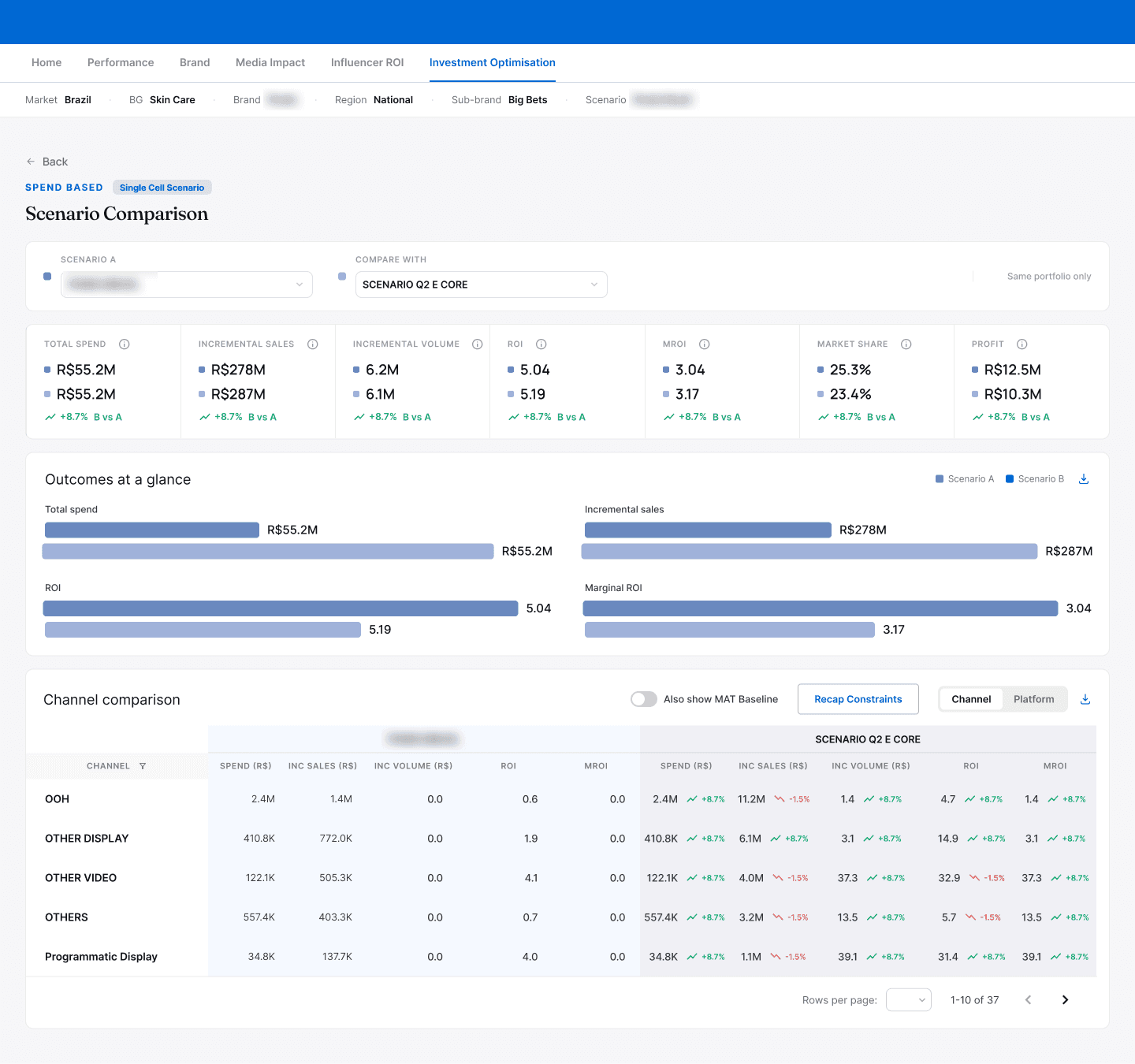
Scenario comparison: two scenarios side by side, with the MAT baseline one toggle away. Put two plans side by side, even across approaches, and decide which one you’re taking into the room.
Outcome
4 → 1. What took four scenarios and manual consolidation is now one portfolio, one run, one result.
- Two ways to plan. Planners can now start from a budget or from a target, in the same journey.
- Built to extend. In flight, and any new kind of rule, slots into the same flow. Goal based was already added this way. So the next piece of work goes into the new feature itself, not into rebuilding what’s underneath.
The designs are handed off to engineering and not in production yet.